Gating & Runner Design for HPDC: Fill Patterns That Prevent Defects
Poor die casting gating design shows up late. You get cold shuts on the far wall, blisters near the gate, and a porosity report that ruins the launch. By then the die is cut and the tool shop is arguing about change orders. Gating is the one part of a die you can still fix on paper, and it decides how metal fills, where air traps, and where heat sits. This guide covers the runner and gate rules we use on production dies for aluminum die casting. You will see how to size gates, where to place them, and which fill pattern stops each common defect.
Key Takeaways
- Gate area is set by cavity volume and fill time, not by the runner the tool shop happens to have in stock.
- Gate velocity for aluminum die casting usually runs 35 to 60 m/s at the gate land.
- Fill the cavity so metal sweeps air ahead of it into overflows at the last point to fill.
- Jet flow and sudden area changes cause turbulence, oxide laps, and cold shuts.
- Run the runner as short and as straight as the part allows, then balance flow to every cavity.
What Gating Design Really Controls
The gate is a nozzle. It takes slow, thick metal from the shot sleeve and turns it into a fast, thin stream that fills the cavity before it freezes. Everything about die casting gating design follows from that job. Gate too small and metal arrives cold, so you get cold shuts, flow lines, and short fills. Gate too large and the metal loses velocity, so it dribbles in, folds over itself, and traps oxide.
Fill time is the master number. A typical cavity fills in 20 to 80 milliseconds. Part volume divided by fill time gives flow rate, and flow rate divided by gate velocity gives gate area. Designers who skip this math copy a gate from another job with a different wall section.
The fill pattern matters just as much. Metal should move through the cavity like a rising tide, not like a garden hose aimed at a wall. A smooth front pushes air to the overflows and vents. A jet stream breaks up, entrains air, and spatters metal onto the die face.
Sizing the Gate and Runner
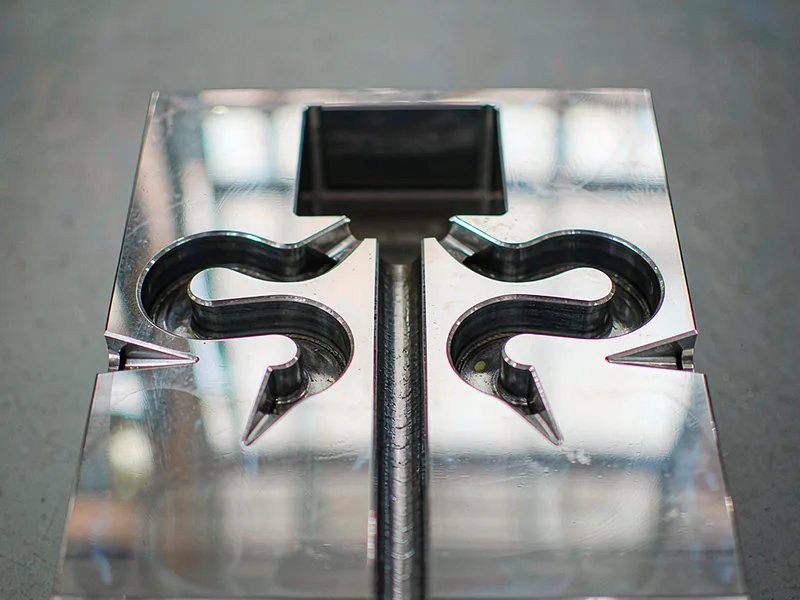
The table below collects the ranges we hold on production tools. Treat these as working values for a well-cooled die, not as hard limits. Anything outside them needs simulation before you cut steel.
| Design parameter | Typical range | Effect if too low | Effect if too high |
|---|---|---|---|
| Fill time | 20–80 ms | Cold shuts, short fill | Cold shuts, oxide laps |
| Gate velocity | 35–60 m/s | Slow front, laps, cold shut | Die erosion, flash, soldering |
| Gate area vs. cavity area | 0.5–2.5% | Cold shut on thin walls | Low velocity, turbulence |
| Runner cross-section | 2–4× gate area | Pressure loss, short fill | Extra metal, longer cycle |
| Gate land length | 1–2 mm | Fast wear at the gate | Metal freezes in the land |
| Gate thickness | 0.6–1.2 × wall | Early freeze, short fill | Long freeze, longer cycle |
| Fill ratio (cavity + runner + biscuit) | 30–50% thermal | Air entrapment | Excess scrap, higher cost |
Values reflect common HPDC practice on aluminum alloys such as A380 and ADC12. Confirm with fill simulation for your exact part and machine.
Notice how the table pulls in two directions. Small gates and high velocity prevent cold shuts but erode the die. Large gates and low velocity protect the steel but trap air. Good runner design finds the point between them for your wall thickness and flow length.
Fill Patterns and the Defects They Cause
The best fill pattern advances one continuous front from the gate to the far end. Air has nowhere to hide, so the overflows catch it and the vents release it. Aim gates along a wall or into a boss, never straight down the middle of a large flat area.
Jet flow is the most common mistake. It happens when the gate is small and the velocity is high. Metal shoots across the cavity, hits the opposite wall, and curls back on itself. The result is a cold shut and an oxide lap where the spray landed. Widen the gate, split it, or aim the stream at a rib.
Cold shuts are the other classic failure. Metal freezes before two fronts can fuse. Thin walls, long flow paths, and cold dies all push toward it. A cold shut shows as a hairline seam that will not take anodize evenly. It usually sits at the last place to fill, so add a gate near the far end.
Balancing Flow in Multi-Cavity Dies
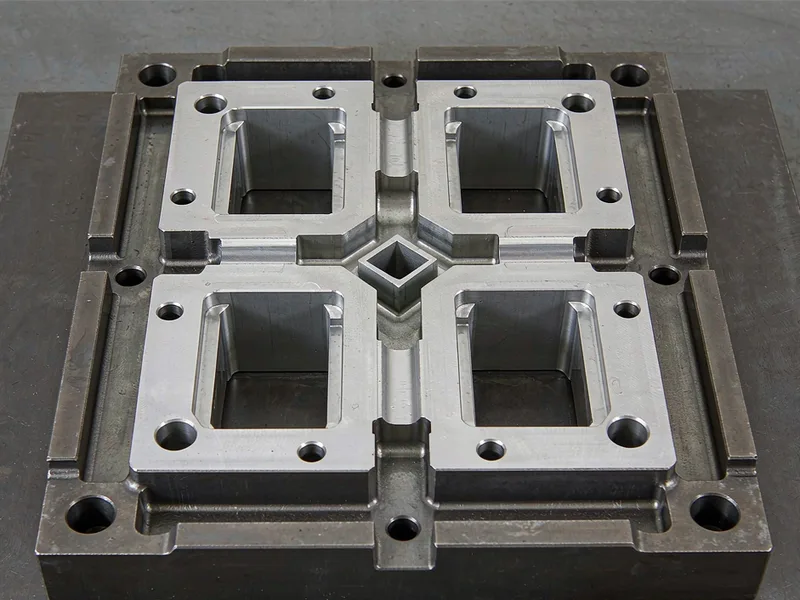
One cavity makes gating simple. Two or more make it a flow-balancing problem. If one cavity sits closer to the sprue, it fills first and takes most of the metal. The far cavity starves, runs cold, and produces rejects. Good die casting gating design lengthens the runner to the close cavity until both paths match in pressure drop.
Matching path length is not enough. A long, narrow runner loses more pressure than a short, wide one. Balance cross-section as well as length. Many shops prefer a trapezoidal runner to a full round one, because the trapezoid is easier to machine and loses less heat.
Thermal balance matters as much as hydraulic balance. Every cavity should reach the same temperature at the same point in the cycle. If one runs hot, it stays liquid longer and shows different porosity.
Where full balance is impossible, a thermal or flow gate helps. The gate is tapered so it adds resistance where metal arrives first. It is a tuning tool, not a shortcut.
How We Prove a Gating Layout Before Cutting Steel
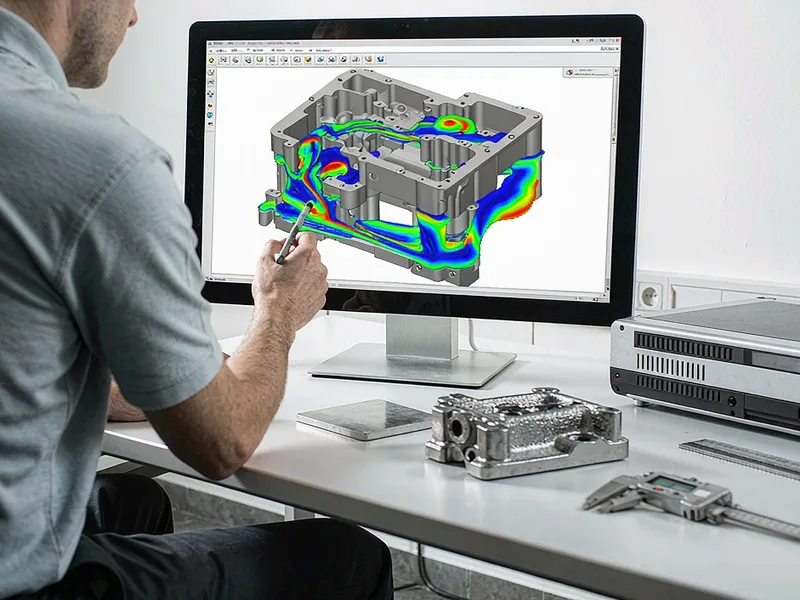
We run fill simulation on every new die, and we run it early. The model shows the metal front at each millisecond, its temperature, and the last points to fill. If the simulation shows a cold front, an air trap, or a jet, we change the gate on the screen. A gate change in CAD costs an hour. The same change after heat treat costs days.
Simulation also sets the process window. It gives the gate velocity range that works and where the overflows must sit. The press operator gets real numbers instead of a guess.
Simulation cannot replace trial runs. Die temperature, plunger lubrication, and shot profile all shift the outcome. We simulate to remove the big errors, then trial to fine-tune the gate land and overflow sizes. That combination takes gating from a 40 percent scrap rate to under 2 percent on a stable cell.
If you are starting a new die, send us the part model, the alloy, and your annual volume. We will return a gate layout with a fill pattern, a runner balance sheet, and the simulation images behind them. That is what die casting gating design should deliver, and it is the cheapest insurance a new program can buy.
External Links
- North American Die Casting Association (NADCA) — industry source for die design practice covering gating, runners, overflows, and venting.
- ASM International — reference material on aluminum alloy solidification and die casting metallurgy behind fill and freeze behavior.
- International Organization for Standardization (ISO) — home of ISO 8062 casting tolerance standards used to check as-cast dimensions after gating changes.
FAQ
What is die casting gating design?
It is the layout of the sprue, runner, and gates that carry molten metal from the shot sleeve into the cavity. It sets fill time, gate velocity, and the fill pattern, so it decides whether the part fills cleanly or shows cold shuts and porosity.
How do I size a gate for an aluminum die casting?
Divide part volume by fill time to get flow rate, then divide flow rate by gate velocity to get gate area. Run gate velocity in the 35 to 60 m/s range and check the result with fill simulation before cutting steel.
Why does my casting show cold shuts near the far wall?
The metal front arrives there last and has already cooled. Widen the gate, shorten the flow path, add a second gate near the far end, or raise the die temperature. Often the fix is a fill pattern change rather than more metal.
What is a balanced runner in a multi-cavity die?
A runner system that sends metal to every cavity at the same time and at the same pressure. Balance path length and cross-section together, then verify it with a steady-state thermal check, not with the first cold shot.
Can I fix a bad gating design after the die is cut?
Sometimes. You can weld and remachine the gate, add or resize overflows, and adjust the shot profile. It is slower and costlier than fixing it in CAD, and it may still leave you with a narrow process window.